
Documentation Index
Fetch the complete documentation index at: https://ngquct-feat-1048-apple-intelligence-transport.mintlify.app/llms.txt
Use this file to discover all available pages before exploring further.
PostgreSQL Connections
TablePro supports PostgreSQL 12 and later via the libpq C connector. Schema browsing, rich type display (JSONB, arrays, UUID, inet), and all standard PostgreSQL query features work out of the box.Quick Setup
Create Connection
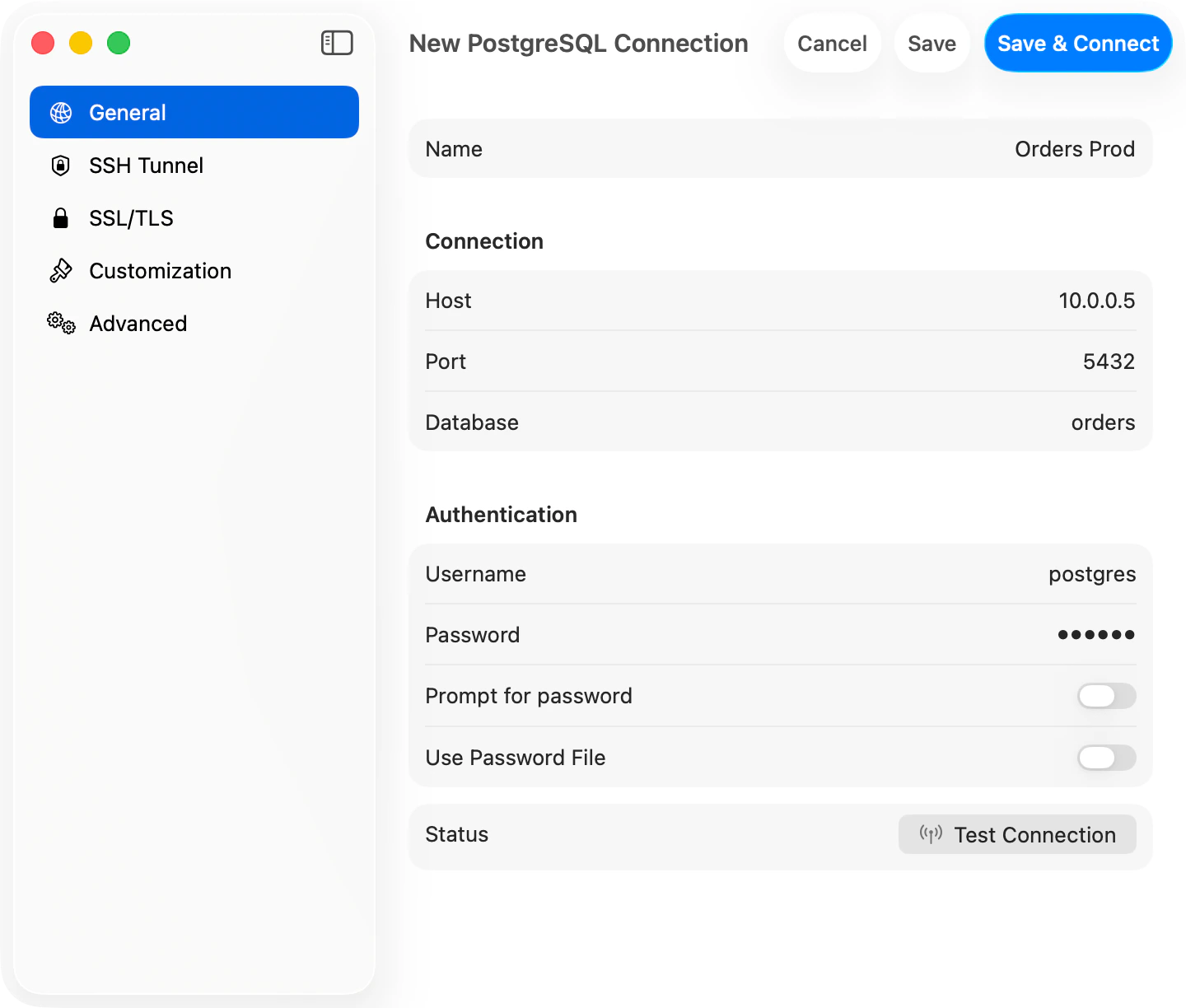
Click New Connection, pick PostgreSQL in the chooser sheet, fill in host/port/username/password/database, and click Save & Connect
Connection Settings
| Field | Default | Notes |
|---|---|---|
| Host | localhost | |
| Port | 5432 | |
| Username | postgres | |
| Database | - | Required (unlike MySQL) |
Example Configurations
Local: hostlocalhost:5432, user postgres, “trust” auth (no password) with Homebrew
Docker: host localhost:5432, password from POSTGRES_PASSWORD env
AWS RDS: Use the endpoint hostname with a password or AWS IAM (see below)
Heroku: Parse DATABASE_URL for credentials
Remote: Use SSH tunneling for secure access
AWS IAM Authentication
Connect to RDS or Aurora with IAM database authentication instead of a static password. Set Authentication in the connection form to one of the AWS IAM options:- AWS IAM (Access Key): enter an access key ID, secret access key, and optional session token.
- AWS IAM (Profile): use a named profile from
~/.aws/credentialsor~/.aws/config. Profiles that usecredential_processwork too, so you can back the profile with SSO or assume-role viaaws configure export-credentials. - AWS IAM (SSO): use a profile backed by IAM Identity Center. Run
aws sso login --profile <name>first.
rds_iam. The AWS Region is detected from the RDS hostname and can be overridden.
TablePro generates a fresh 15-minute login token on every connect and reconnect, so you never paste an expiring token. SSL is required for IAM and is turned on automatically.
Features
Sidebar displays all accessible schemas and tables. Switch databases/schemas with Cmd+K. Table info shows structure (columns, indexes, constraints) and DDL. Full PostgreSQL syntax support:PostgreSQL-Specific Types
Supportsjsonb (formatted JSON), array, uuid, inet (IP), timestamp with time zone, interval, bytea (binary).
PostGIS
If the PostGIS extension is installed,geometry and geography columns render as EWKT with the SRID preserved (SRID=4326;POINT(-73 40.7237)) instead of the raw EWKB hex libpq returns. TablePro detects spatial columns from a one-time pg_type lookup at connect time, then converts the fetched values with ST_AsEWKT(...). Your query is never re-run, so parameterized, multi-statement, and any other query shape all render EWKT. NULL stays NULL and POINT EMPTY round-trips. If the conversion fails, the raw hex is kept without an error.
Troubleshooting
Connection refused: Check server is running (brew services start postgresql@16), verify listen_addresses in postgresql.conf, ensure firewall allows port 5432.
Auth failed: Check pg_hba.conf for correct auth method (md5/scram-sha-256 for passwords, trust for local dev). Reset password with ALTER USER postgres WITH PASSWORD 'newpassword';
Database doesn’t exist: Connect to postgres database and create it with CREATE DATABASE myapp;
Permission denied: Grant access with GRANT ALL ON DATABASE/SCHEMA/TABLES TO username;
SSL/TLS: New connections default to Preferred (libpq sslmode=prefer), which tries TLS first and falls back to plain. Works for both local Postgres and hosted providers (AWS RDS, Cloud SQL, Heroku, Supabase, Neon). Pick Verify CA when you need to validate the server certificate. See SSL/TLS for details.
Postgres-compatible engines: Connect wire-compatible engines (such as db9.ai) using the PostgreSQL type. TablePro checks which system catalogs each server actually provides, so engines that omit catalogs like pg_matviews still load their tables; materialized views or foreign tables just won’t appear if the server doesn’t expose them.
Advanced Configuration
Startup Commands (Advanced tab): Set session variables likeSET timezone = 'UTC'; SET search_path TO myschema, public; to apply automatically on connect.
~/.pgpass Support: Use format hostname:port:database:username:password with wildcards (*). Must have chmod 0600 permissions.
Pre-Connect Script (Advanced tab): Run a shell script before connecting (e.g., to refresh credentials from a secrets manager). 10-second timeout.
PostgreSQL Extensions: PostGIS, hstore, ltree work out of the box. Check with SELECT * FROM pg_extension;
Performance: Use EXPLAIN ANALYZE for query optimization. LIMIT large exploratory queries, create indexes, enable pagination.
MySQL Migration Notes: Use SERIAL (not AUTO_INCREMENT), LIMIT y OFFSET x syntax, double quotes for identifiers, GENERATED AS IDENTITY for new schemas.